Roles
On this page you settle two things: what ordinary administrators may not do, and what group administrators (group admins for short) may do for their groups.
Administrators only
Only administrators see this page. Only super administrators see and change the Restrictions for users with the 'Administration' permission card.
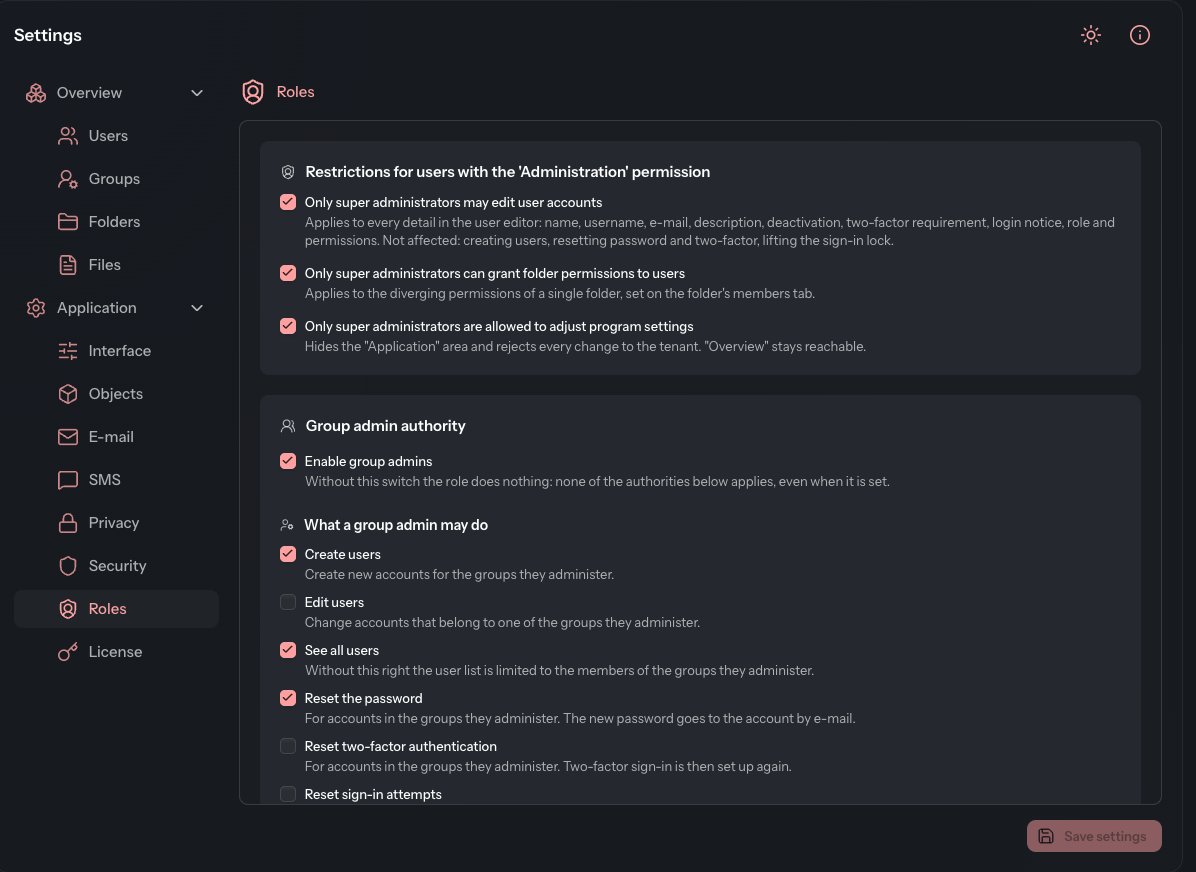
Restrict administrators
A super administrator can withdraw individual powers from ordinary administrators (users with the Management permission) without taking the permission away entirely.
- Open Settings › Application › Roles.
- In the Restrictions for users with the 'Administration' permission card, select the restrictions you want.
- Click Save settings.
| Setting | Effect |
|---|---|
| Only super administrators may edit user accounts | Applies to every detail in the user editor: name, username, e-mail, description, deactivation, two-factor requirement, login notice, role and permissions. Administrators may still create users, reset passwords and two-factor authentication, and lift the sign-in lock. |
| Only super administrators can grant folder permissions to users | Applies to a user's differing permissions in a single folder, set on the folder's Members tab. |
| Only super administrators are allowed to adjust program settings | Hides the Application area of the settings from administrators. Overview stays reachable. |
Set up group admins
A group admin manages the members of their own groups in Group administration. You decide here what they may do there.
- In the Group admin authority card, select Enable group admins.
- Under What a group admin may do, select the authorities you want.
- Under Which permissions a group admin may grant, select the permissions they may pass on to accounts.
- Click Save settings.
Without Enable group admins the role does nothing. None of the authorities applies then, even when it is ticked.
What a group admin may do
| Authority | Meaning |
|---|---|
| Create users | Create new accounts for the groups they administer. |
| Edit users | Change accounts that belong to one of the groups they administer. |
| See all users | Without this right, the user list shows only the members of the groups they administer. |
| Reset the password | For accounts in the groups they administer. The new password goes to the account by e-mail. |
| Reset two-factor authentication | For accounts in the groups they administer. The user then sets up two-factor sign-in again. |
| Reset sign-in attempts | Releases an account that is locked after too many failed attempts. |
| Delete files | In every folder reachable through one of the groups they administer, no matter who uploaded the file. |
Which permissions a group admin may grant
This selection only applies when a group admin creates or edits an account. Permissions not ticked here are withdrawn from the account in the process.
- PDF-Viewer
- Download
- Upload
- Edit own files
- Edit other files
- Delete own files
- Delete others files
- File log
- Send notifications
On a folder's Members tab and in the profile, the same nine permissions are named slightly differently. The mapping is given under Permission system.