History
The history shows what has happened to a file: who uploaded, viewed, downloaded or changed it, and when. The DocSecBox writes every entry itself. An entry cannot be changed or deleted.
Who sees the history
The History tab is visible to administrators, to whoever uploaded the file, and to anyone with the View logs permission in the folder (see Members).
View the history
- Select the file in the list and open the History tab on the right.
- Under Origin, choose between Registered users and Shares.
- To narrow the list down, type into the Search for user, action or new status... field.
- To save the entries of the open sub-tab as a PDF, click Export as PDF....
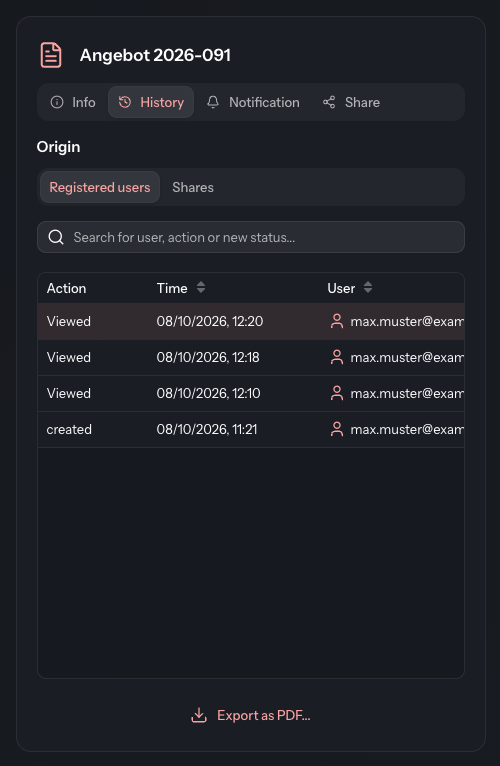
The newest entries are at the top.
Registered users
This lists what users with an account in the DocSecBox have done with the file. The columns are Action, Time and User.
| Action | Meaning |
|---|---|
| created | The file was uploaded. |
| Viewed | Someone opened the file, for example with View. |
| downloaded | Someone downloaded the file. |
| edited | Someone changed the file's details. |
| Status changed | Someone changed the status. Click the info icon next to it to see the new value under New status. |
| marked as done / removed mark | Someone ticked the file in the done column, or removed the tick again. |
| marked as read | Someone marked the file as read without opening it. |
The small preview on the Info tab does not appear here. It does not count as an access.
Shares
Only administrators see this sub-tab. It shows everything to do with shares of this file: the file's own shares and the accesses from outside through a public folder share. The Share column says which kind the access came through: File or Folder.
| Action | Meaning |
|---|---|
| created | An administrator created a share. |
| Shared | The link was sent by e-mail and the password by text message. |
| SMS Error / E-mail error | For a share by text message, the text message or the e-mail did not go out. |
| Viewed | A recipient viewed the file. |
| downloaded | A recipient downloaded the file. |
| Revoked | An administrator revoked the share. |
| Expired | Someone opened an expired or revoked link. |
For accesses by recipients without an account, the User column stays empty.
Views
Every view and download also counts towards the Views on the file's Info tab.